
How to Choose a Server Location for Trading
For automated forex trading, choosing the right VPS location can directly affect the speed and consistency of trade execution. A powerful VPS is not necessarily the best choice if it is located far from your broker’s trading server.
The key question is not simply “Which VPS is fastest?” It is: “Which VPS location provides the lowest and most stable connection to my broker’s trading server?”
VPS latency benchmarking helps traders compare different server locations before running an Expert Advisor (EA) with real capital. By measuring latency, jitter, packet loss, and connection stability, traders can choose a VPS location based on actual network performance rather than marketing claims.
This guide explains how to choose a VPS location for trading, how to find your broker’s trading server, how to benchmark different locations, and how to determine whether low latency is important for your trading strategy.
Why VPS Location Matters for Forex Trading
A VPS can have excellent hardware specifications and still be a poor choice for automated trading if its network connection to the broker is slow or unstable. Before choosing a location, it is also important to understand why traders use VPS for automated trading and how VPS infrastructure affects execution.
For forex trading, it is useful to separate two types of performance:
- VPS performance: CPU, RAM, storage, and platform responsiveness
- Network performance: latency, jitter, packet loss, routing, and connection stability
Hardware affects how efficiently your trading platform and EA operate, while network conditions affect how quickly trading requests travel between your VPS and broker.
Why Distance Between Your VPS and Broker Matters
Every trade sent by an EA follows a communication path:
EA → Trading platform → VPS → Broker server → Execution → VPS
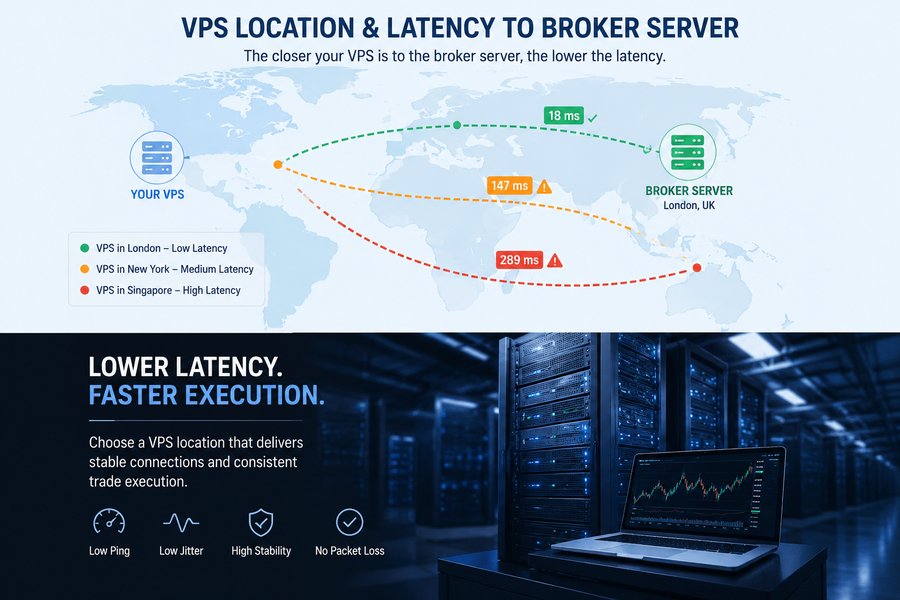
The greater the network distance between the VPS and broker server, the greater the potential for network latency.
A VPS located close to the broker’s trading infrastructure can provide a faster connection than a more powerful VPS located thousands of kilometers away.
For strategies that depend heavily on execution timing, reducing unnecessary network delay can be particularly important.
VPS Location vs. VPS Hardware
VPS providers may advertise:
- High CPU performance
- Large memory capacity
- Fast SSD storage
- Premium infrastructure
These features are useful, but they cannot eliminate the network delay created by distance and routing.
A basic VPS with a stable connection to your broker can therefore be more suitable for trading than a more powerful VPS with a poor network route.
Should Your VPS Be Near You or Your Broker?
For automated trading, the VPS should generally be chosen based on the location of your broker’s trading server, not your physical location.
For example, if you are located in London but your broker’s trading server is in New York, a New York VPS may provide a better connection to the broker than a London VPS.
The important network path for automated execution is:
VPS → Broker trading server
Your physical location is much less important when the EA is running continuously from the VPS.
However, geographic proximity alone does not guarantee the best performance. Two VPS providers in the same city can produce different latency because they use different networks, routing paths, and data center infrastructure.
This is why the final decision should be based on actual latency testing, not location alone.
For traders using Otet Markets, the same principle applies: VPS location should be selected based on the trading server used by the account rather than the trader’s physical location. Before choosing a VPS, check the server details in your trading platform or contact OTET Markets support to confirm the relevant trading infrastructure.
How to Find Your Broker’s Trading Server Location
Before choosing a VPS location, identify the trading server used by your account.
Your broker’s headquarters does not necessarily indicate where its trading servers are located. A broker may use:
- Multiple server locations
- Different servers for different account types
- Separate demo and live servers
- Financial data center infrastructure
Check Your MT4 or MT5 Server Information
Platforms such as MT4 and MT5 can provide information about the broker server associated with your trading account.
Look for:
- Server name
- Server address
- Connection information
- Data center information, where available
Do not assume that the broker’s company address represents the location of its trading server.
Use Ping and Traceroute to Identify the Network Route
If you have access to the broker’s server address or hostname, network testing tools can help you investigate the connection.
Useful tests include:
- Ping
- Traceroute
- IP lookup tools
- Network monitoring utilities
These tests can help identify network response times and routing paths.
An IP-based geographic location should be treated as an approximation rather than absolute proof of the physical location of the broker’s financial infrastructure.
Contact Your Broker for the Server Location
If you cannot determine where your trading server is located, contact your broker’s support team.
Ask specifically:
“Where is the trading server for my live account hosted?”
If you use automated trading, you can also ask whether the broker recommends a particular data center or VPS location.
How to Benchmark VPS Locations for Trading
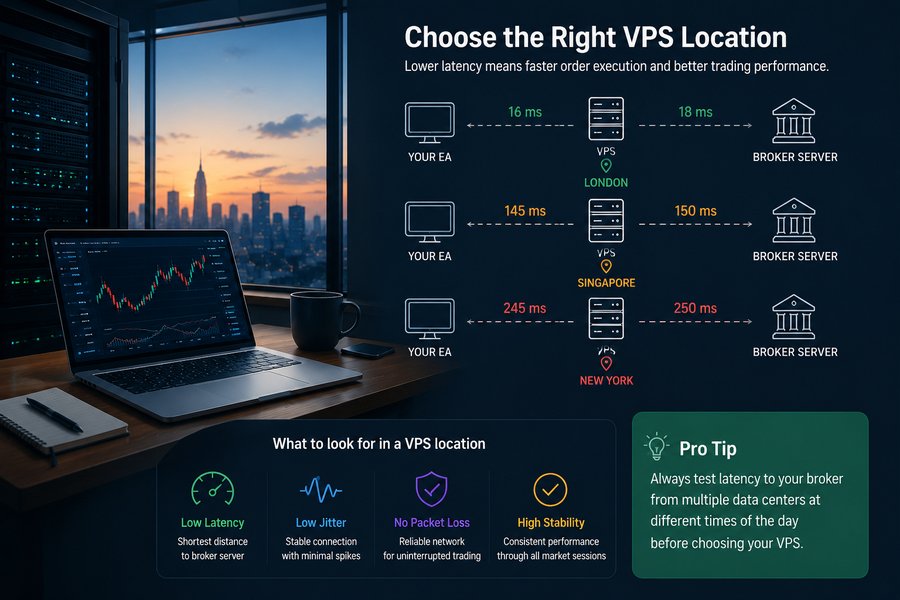
Choosing a VPS location should be based on measurement rather than assumptions.
A proper VPS latency benchmarking process compares several potential server locations and measures their connection to the same broker trading server.
The objective is not simply to find the lowest ping once. The goal is to identify the location that provides low and stable latency over time.
Test Multiple VPS Locations
Start by selecting several potential VPS locations based on the broker’s server location.
For example, if your broker’s infrastructure is in Europe, you could compare:
- London
- Frankfurt
- Amsterdam
If the broker’s infrastructure is in North America, you could compare:
- New York
- Other nearby North American locations
Testing several locations gives you a more reliable basis for choosing the final VPS.
Test Latency at Different Times
Network performance can change throughout the day.
Test each VPS location during:
- Major market sessions
- Market opening periods
- High-volume periods
- News events
- Quiet market conditions
A single ping test can provide a misleading picture of the connection.
Compare Average, Minimum and Maximum Latency
When benchmarking each location, record:
| Measurement | What It Shows |
|---|---|
| Minimum latency | Best observed network response |
| Average latency | Typical connection speed |
| Maximum latency | Potential latency spikes |
| Jitter | Variation in latency |
| Packet loss | Connection reliability |
A location with a slightly higher average latency but much greater consistency may be preferable to a location that occasionally produces an extremely low ping but experiences large spikes.
What Latency Should You Look for When Choosing a VPS Location?
Latency is one of the most important measurements when comparing VPS locations, but it should not be considered in isolation.
Ping and Round-Trip Latency
Ping measures the round-trip response time between two network endpoints and is generally measured in milliseconds (ms).
Lower ping generally means less network delay.
For example:
- 10 ms
- 20 ms
- 40 ms
- 80 ms
A 10 ms connection generally has less network delay than an 80 ms connection.
However, a low ping does not automatically mean that the connection is stable.
Jitter and Latency Stability
Jitter measures how much latency changes over time.
For example:
- Test 1: 10 ms
- Test 2: 12 ms
- Test 3: 45 ms
Although the average may appear acceptable, the large variation indicates an unstable connection.
When comparing VPS locations, consistent latency can be more useful than simply finding the lowest number from a single test.
Packet Loss
Packet loss occurs when data packets fail to reach their destination.
A VPS location with low latency but regular packet loss may provide a worse trading environment than a location with slightly higher latency and a more reliable connection.
When comparing locations, look for:
- Low latency
- Low jitter
- Little or no packet loss
- Consistent performance
Is Lower Latency Always Better?
Not necessarily.
For example, a VPS location that produces a stable 15 ms connection may be more suitable than one that occasionally produces 8 ms but frequently spikes to 50 or 100 ms.
The objective is not to find the lowest single ping.
The objective is to find the lowest stable latency to your broker.
To understand how execution delays, volatility and liquidity can affect your final fill price, see our guide to slippage in trading.
How to Choose Between London, New York, Frankfurt and Singapore VPS Locations
London, New York, Frankfurt, Singapore, and other major financial hubs are popular VPS locations because they contain significant financial and data center infrastructure.
However, popularity should not determine your final choice.
The correct location is the one that produces the best measured connection to your broker.
London VPS for Forex Trading
London can be a strong candidate when your broker’s trading infrastructure is located in the UK or nearby European markets.
Test London against other European locations rather than assuming it will automatically be the fastest.
New York VPS for Trading
New York can be suitable when your broker’s trading infrastructure is located in the United States or North America.
Compare it against other nearby locations to identify the most stable route.
Frankfurt VPS for Forex Trading
Frankfurt is another important European data center location.
It can be worth testing when your broker’s infrastructure is located in Germany or elsewhere in continental Europe.
Singapore VPS for Trading
Singapore can be a useful VPS location when your broker’s trading infrastructure is located in Asia-Pacific.
If your broker’s server is in Europe or North America, however, Singapore may introduce unnecessary network distance.
How to Compare VPS Locations Before Choosing One
Once you have tested several locations, compare them using the same measurements.
| VPS Location | Average Latency | Jitter | Packet Loss | Stability |
|---|---|---|---|---|
| London | 12 ms | Low | 0% | High |
| Frankfurt | 16 ms | Low | 0% | High |
| New York | 74 ms | Medium | 0% | Medium |
The lowest ping should not automatically determine the winner.
For example, if London produces 12 ms consistently while another location produces 8 ms but regularly spikes to 60 ms, the London VPS may provide a more reliable trading environment.
The final decision should consider:
- Average latency
- Latency consistency
- Jitter
- Packet loss
- Network routing
- Stability during active market conditions
Does VPS Location Matter for Every Trading Strategy?
The importance of VPS location depends partly on how sensitive your trading strategy is to execution speed. Traders should also consider their forex trading accounts, spreads and execution conditions when choosing their trading setup.
VPS Location for Scalping and Short-Term EAs
Low and stable latency can be more important for:
- Scalping EAs
- Short-term automated strategies
- High-frequency approaches
- Strategies sensitive to execution timing
For these systems, unnecessary network delays can have a greater effect on execution conditions.
VPS Location for News Trading
News trading systems can also be sensitive to execution timing because prices and spreads can change rapidly around major economic events.
For these strategies, testing VPS locations under active market conditions can be particularly useful.
VPS Location for Swing and Long-Term Trading
Latency is generally less important for systems that hold positions for hours, days, or weeks.
For example, a difference of several milliseconds is unlikely to have the same practical impact on a long-term strategy as it might on a highly time-sensitive scalping system.
Test the VPS Location Before Committing
Before choosing a VPS location for long-term use, test the actual environment with your broker and trading setup.
Run Your EA From the VPS
Install your actual:
- MT4 or MT5 platform
- EA
- Indicators
- Trading configuration
Then monitor how the system performs under realistic market conditions.
Monitor Latency and Stability
During the trial, monitor:
- Average latency
- Latency spikes
- Jitter
- Packet loss
- Connection interruptions
- Platform connectivity
The goal is to determine whether the VPS location remains reliable rather than simply achieving a good result in one test.
Compare the VPS With Alternative Locations
If another VPS location provides similar hardware but a more stable connection to your broker, it may be the better choice.
Two VPS providers in the same city can still produce different results because of their network providers and routing paths.
Therefore, test the actual VPS rather than assuming that all servers in the same geographic region will perform identically.
Conclusion
The best VPS location for trading is not necessarily the location closest to you, the most popular financial hub, or the provider with the strongest hardware.
The right approach is to:
- Identify your broker’s trading server.
- Select several potential VPS locations.
- Benchmark their latency.
- Compare jitter, packet loss, and stability.
- Test the locations under different market conditions.
- Choose the location that provides the most reliable connection to your broker.
For latency-sensitive strategies such as scalping and news trading, choosing the right VPS location can be particularly important. For longer-term strategies, the difference between locations may have less practical significance. Traders focused on competitive spreads and execution conditions can also compare the ECN account available at OTET Markets.
Ultimately, VPS location should be selected based on measured network performance between your VPS and broker—not marketing claims or geographic assumptions.
Sources and References
- MetaQuotes — MetaTrader 4 and MetaTrader 5 Platform Documentation
- MQL5 Community — Articles about Expert Advisors, VPS hosting, and automated trading
- Financial data center and cloud infrastructure documentation from major hosting providers
- General network performance concepts including latency, ping, jitter, and routing
FAQ
Your broker’s server location can usually be found through your trading platform, broker support, or network testing tools. Platforms such as the MT5 platform often display server information when connecting to an account.
For many automated trading systems, latency below 50 milliseconds is generally considered good. However, the ideal number depends on the trading strategy and broker infrastructure.
A closer VPS usually reduces network delay, but it does not guarantee better trading results.
Many VPS providers offer trial periods or short-term plans that allow traders to test performance before committing.
Share
Hot topics

STP, NDD, ECN and DMA: Broker Execution Models Decoded
When picking a forex broker, we don’t just look at the brokerage that has the lowest spreads, bonuses, and other kind of what is apparent for us. There is one...
Read more




Submit comment
Your email address will not be published. Required fields are marked *